Load Balancers
Load balancers monitor and route network traffic flowing to and from a pool of physical or virtual servers. Load balancers can be hardware (e.g., load balancing routers) or software (e.g., Citrix ADC Virtual Platform). Load balancers distribute the traffic evenly, or by customized rules, across multiple servers. This function maximizes server performance and prevents the flow of traffic from overwhelming any one server and its resources. Basic server resources normally include CPUs, RAM, and network bandwidth. Servers can also offer other resources, like applications, file servers, database services, and more.
Load balancers can also detect when a server has failed and can reroute and balance network traffic across the remaining servers. This important business continuity and reliability function is often referred to as high availability. Additionally, load balancers provide IT Support professionals with the ability to add and remove servers to the pool as needed.
Load balancing terminology
The following short glossary includes some common terminology for several concepts related to load balancers:
-
Client: A computer or program that sends requests to a server. For example, a client could be a browser that requests a web page from a web server. It could also be a workstation requesting a file from a file server.
-
Host/node: A physical or virtual server that receives network traffic from an Application Delivery Controller (ADC). The server is identified by its IP address. Whether the server is called a “host” or a “node” depends on the terminology used by the vendor of the load balancing solution.
-
Member: A host/node that receives network traffic on a specified TCP port. The host/node is identified by its IP address plus the TCP port of the app that should receive network traffic.
-
Pool/cluster/farm: A grouping of hosts/nodes or members that offer similar services, such as application or web services.
-
Application Delivery Controllers (ADC): Physical appliances, virtual appliances, or software that provide load balancing services by managing traffic between clients and host/node or member pools. ADCs can also provide other important services such as security and encryption.
-
Path-based routing: Routes network traffic based on URL paths.
-
Listener: A software process that checks network traffic for client requests and forwards them to target groups.
-
Open Systems Interconnection (OSI) model: Model that depicts the seven layers of computer data communications: 7-application, 6-presentation, 5-session, 4-transport, 3-network, 2-data, and 1-physical.
-
Front end: In load balancing environments, the front end can include the ADC system and any virtual servers that act as proxies for client communications with the ADC system and the back end servers.
-
Back end: In load balancing environments, the back end normally includes the pool/cluster/farm systems. The back end can also include disk storage systems.
-
Distributed applications: Software stored on cloud platforms or physical servers that can run on multiple networked computers at the same time.
-
Containerization: Isolated runtime environments that can deploy and run distributed applications through application virtualization. This method is faster and is more scalable than older load balancing solutions.
-
Availability Zones (AZs): Regional data centers that host cloud platforms and are configured for high availability.
-
Elastic Load Balancer (ELB): Enables the use of more than one Availability Zone.
-
SSL/TLS: Network protocols for encrypted communication.
Example ADC process for load balancing
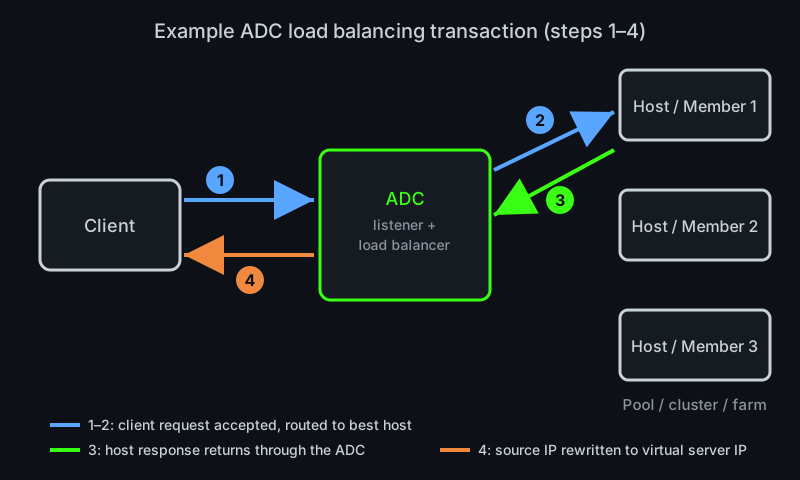
The following steps are an example of one possible load balancing configuration using an ADC solution:
-
[Blue arrows] The client sends a connection and an information request to the ADC service.
-
[Blue arrows] The ADC listener detects and accepts the connection. Then the ADC load balancing service analyzes the best host (or member) routing path for the client request. The ADC changes the destination IP to the address (and possibly the TCP port) of the selected host (or member).
-
[Green arrows] The host or member approves the client connection and routes a response to the client through the ADC.
-
[Orange arrows] The ADC changes the source IP (and TCP port, if applicable) to a virtual server IP (and port) before forwarding the response to the client. The clients will continue to use the IP address of the virtual server for further communications.
Load balancing types
-
Application Load Balancer: Operates at the application layer (HTTP and HTTPS) of the OSI model. Application load balancers also scan traffic for HTTP errors and coding bugs, as well as guard applications against distributed denial-of-service (DDoS) attacks.
-
Network Load Balancer: Operates at the transport layer (TCP/UDP) of the OSI model. Network load balancers can route millions of client requests per second and handle volatile workloads. Network load balancers also support static IP addressing and containerization, among other services.
-
Classic Load Balancer: Can operate at either the application layer (HTTP/HTTPS) or the transport layer (TCP/SSL). Classic load balancers use fixed ports for communication.
-
Gateway Load Balancers: Operates at the network layer (IP) of the OSI model. Gateway load balancers have listeners on all ports that scan every IP packet in the network traffic and route each request to the target pools, as defined by the listener configuration. A gateway load balancer is the only point of entry and exit for network traffic.
Load balancers in cloud environments
In cloud environments, load balancing across virtual servers is configured through the cloud platform. A few of the load balancing options offered by several top cloud platforms include:
-
Google Cloud: Google offers an array of options for load balancers, such as application and network level load balancing, software-defined load balancing, multi-region failover, and seamless autoscaling. Google Cloud also offers external, internal, global, and regional load balancing. For security measures, the load balancers are integrated with Google Cloud Armor, which protects against distributed denial-of-service (DDoS) attacks.
-
Amazon Web Services (AWS): AWS offers three ELB solutions: an Application Load Balancer, a Gateway Load Balancer, and a Network Load Balancer. AWS ELBs provide security through user authentication, certificate management, and SSL/TLS decryption.
-
Microsoft Azure: Operates at the transport layer of the OSI model. Azure load balancer is the only front end point for accepting client requests to route to the back end server pools. The backend pool may consist of Azure Virtual Machines (VMs) or instances running in Azure virtual machine scale sets. Azure offers public load balancers for internet traffic and private/internal load balancers for private virtual networks. Azure’s Standard load balancer uses the zero trust security model.
Load balancers in physical environments
In physical environments, such as server rooms and data centers, load balancing can be configured across multiple servers with operating systems like VMware. Network traffic loads can also be configured for smaller environments across two servers in a physical active-active cluster. In active-active clusters, both servers actively handle network traffic simultaneously.