Windows - View User and Group Information
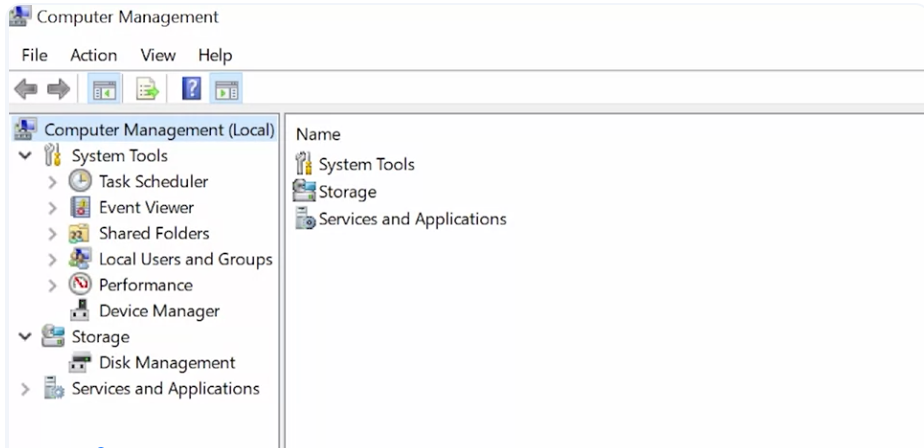
Computer management: A tool that lets you manage a local or remote computer
Windows domain: A network of computers and users that are added to a central database
-
if you’re an admin in that domain, you can view those accounts on any machine in the domain
-
Task scheduler. This lets you schedule programs and tasks to run at certain times, like automatically shutting off the computer at 11:00 PM every night.
-
Event viewer. This is where our system stores its system logs.
-
Shared folders. This shows the folders that different users on the machine share with each other.
-
Local users and groups. This is where we’ll be doing our user and group management.
-
Performance. This shows monitoring for the resources of our machine, like CPU and RAM.
-
Device manager. This is where we go to manage devices to our computer, like our network cards, sound cards, monitors, and more.
-
Storage menu, we have a sub menu for disk management.
-
Services and applications menu shows us the programs and services that we have available on the system.
- we can choose to enable and disable services such as DNS here
User Account Control (UAC) - a feature in Windows that prevents unauthorized changes to a system
- changes have to be approved by an admin instead