Linux - Package Manager Apt
The APT(Advanced Package Tool) package manager is used to extend the functionality of the package.
- It makes package installation a lot easier.
- It installs package dependencies for us, makes it easier for us to find packages that we can install, cleans up packages we don’t need, and more.
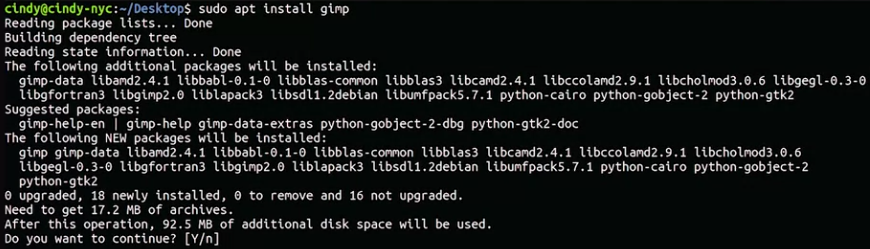
Let’s see how we would install the open-source graphical editor GIMP using APT.
Sudo apt install gimp. Let’s take a look at what this command is doing. apt grabs the dependencies that this package requires automatically and asks us if we want to install it.
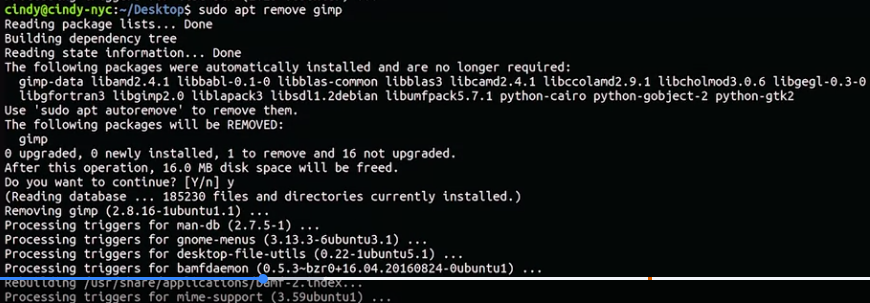
 Now, let’s remove this package. Sudo apt remove gimp You can see that it removes dependencies for us that we’re not using anymore because we don’t need gimp.
Repository: A server that acts like a central storage location for packages
In Linux, where do you add a package or repository link? The repository source file in Ubuntu is /etc/apt/sources.list.
Personal package archives: A software repository for uploading source packages to be built and published
If you want to get the latest package updates, you should update your package repositories with the apt update and then apt upgrade commands. The apt update command updates the list of packages in your repositories so you get the latest software available, but it won’t install or upgrade packages for you. Instead, once you have an updated list of packages, you can use apt upgrade and it’ll install any outdated packages for you automatically.
- Before installing new software, it’s good to run apt update to make sure you’re getting the most up-to-date software in your repositories.

- You’ll also want to run apt upgrade to install any available updated packages on your machine.

For more information about PPAs, check out the link here
For more information on how to install the open-source graphical editor GIMP click here