Operating Systems Deployment Methods
One tool we can use to image computer is a disk cloning tool. It makes a copy of an entire disk and allows you to backup a current machine or set up a new one. The benefit of this cloning over standalone installation media is that you can also install settings and folders that you might need
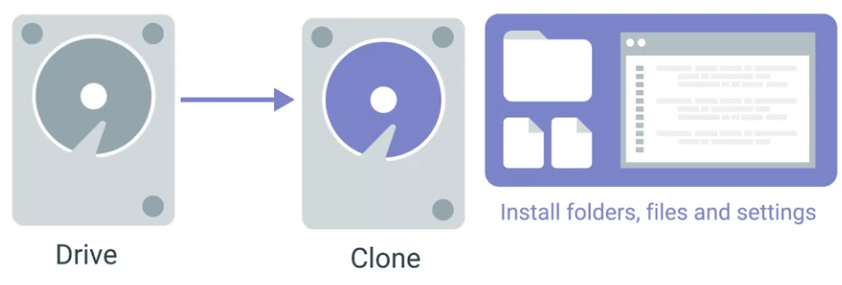 One of the many disk cloning tools out there is the open-source software clone Zillow. It can be used to backup and restore a single machine or many machines simultaneously.
A popular commercial imaging tool is semantic ghost.
One of the many disk cloning tools out there is the open-source software clone Zillow. It can be used to backup and restore a single machine or many machines simultaneously.
A popular commercial imaging tool is semantic ghost.
With a disk imaging, lots of tools offer different ways you can clone a disc. One option is disk-to-disk cloning, where you connect an external hard drive to the machine you want to clone.
You can conduct a hard drive like your HDD is an SSDs into something known as an external hard drive duck. These devices are great IT tools that look like toasters. Once you connect your external hard drive, you can use any disk cloning tool of your choice.
Let’s use the Linux command line tool dd to copy files. Dd is a lightweight tool that’s also used to clone a drive.
First, we want to make sure we have this drive unmounted. Then we want to run dd.
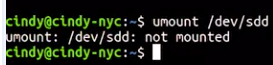
 This just says I’m going to copy the contents of /dev/sdd, which is the USB drive, and save it to the desktop in an image file.
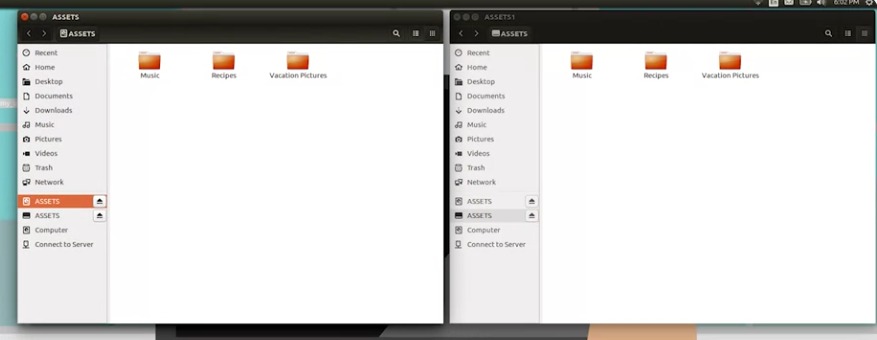
Once the image file is saved, if we open it up, we should see the exact same contents as the USB drive
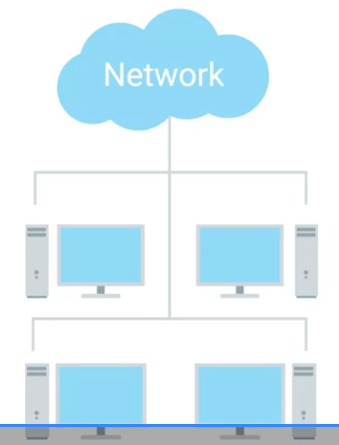
Another method you can use to image a machine is to request the images directly from the network. Lots of operating system manufacturers today offer network-initiated deployments.
OS Deployment Methods
In this reading, you will learn about operating system (OS) deployment methods, including the use of disk cloning. A cloned disk is an identical copy of a hard drive. Cloning is often used when an Enterprise company purchases a large number of identical computers. The IT Support Administrators for the company are responsible for installing and configuring the computers to meet the needs of the company and its network. Disk cloning is used to save time on this type of deployment. IT Administrators will select one of the new computers to install and configure needed items, such as the OS, utilities, tools, network settings, software, drivers, firmware, and more. Then they make a clone of this first hard drive. The cloned disk is used to copy the entire disk image over to the remaining new computers so that the IT Admins do not need to repeat the same installation and configuration steps on each new computer. They may keep a copy of the original disk from this deployment to reimage the systems if a clean OS install is required (e.g., following a virus or malware infection, OS corruption, etc.).
Cloned disks have uses beyond deploying OSs. They can be used to test new software and configurations in a lab environment before applying the updates to similar production systems. Cloning can also be used for system migrations, data backups, disk archival, or to make a copy of a hard drive for investigative or auditing purposes.
Tools for duplicating disks
Hard disk duplicator
Hard drive duplicators are machines that can make identical copies of hard drives. The original drive is inserted into the duplicator machine along with one or more blank hard drives as targets. Disk duplicators can have anywhere from a single target bay for limited disk cloning (example use: law enforcement investigations) up to 100+ target bays for industrial use (example use: computer manufacturing). If the target drives are not blank, the duplicator machine can wipe the drives. The target drives usually need to share the same characteristics (e.g., interface, form factor, transfer rate) of the original drive. The targets should also have the same or greater storage capacity than the original.
The hard drive duplicator may have an LCD interface built-in to the machine and/or a management software/HTML interface, the latter of which can be accessed over a networked or directly-connected computer or server. The duplicator interface can be used to initiate and manage disk cloning and/or disk wiping (reformatting). Most duplicators copy data sector-by-sector. The time to transfer data from the original to the target drives depends on multiple variables. The machine’s user manual should be consulted to calculate duplication time.
Disk cloning software
Hard drives can also be cloned using software. This method allows the original and target to be different media from one another. For example, a hard drive can be cloned from an IDE drive to an SSD drive, a CD-ROM/DVD, removable USB drive, cloud-based systems, or other storage media, and vice versa. Software cloning supports full disk copies (including the OS, all settings, software, and data) or copies of selected partitions of the drive (useful for data-only or OS-only copies). Disk cloning software is often used by IT Administrators who need to deploy disk images across a network to target workstations or to cloud-based systems. Cloud platforms normally offer a virtual machine (VM) cloning tool as part of their services. VM cloning is the most efficient method for cloning servers and workstations. VM cloning takes a few seconds to deploy new systems.
A few examples of disk cloning software include:
-
NinjaOne Backup - Cloud-based cloning, backup, and data recovery service designed for managed service providers (MSPs) and remote workplaces.
-
Acronis Cyber Protect Home Office - Desktop and mobile device cloning software that works with Windows, Apple, and Android systems. Designed for end users. Supports backup, recovery, data migration, and disk replication. Includes an anti-malware service that can overcome ransomware attacks.
-
Barracuda Intronis Backup - Cloud-based cloning and backup service on a SaaS platform. Designed for MSPs who support small to mid-sized businesses. Can integrate with professional services automation (PSA) and remote monitoring and management (RMM) packages.
-
ManageEngine OS Deployer - Software for replications, migrations, standardizing system configurations, security, and more. Can create images of Windows, macOS, and Linux operating systems with all drivers, system configurations, and user profiles. These images can be saved to a locally stored library. The library is available to deploy OSs to new, migrated, or recovered systems as needed.
-
EaseUS Todo Backup - Free Windows-compatible software for differential, incremental, and full backups, as well as disaster recovery. Supports copying from NAS, RAID, and USB drives.
Methods for deploying disk clones
The sections above have described disk clone deployment through copied hard drives, image libraries, network storage, and cloud-based deployments. There are some other options for cloned disk deployments:
Flash drive distribution
OSs can be distributed on flash drives. IT professionals can format flash drives to be bootable prior to copying a cloned disk image to the flash drive. Target systems should be set to boot from removable media in the BIOS. After inserting a flash drive containing the OS into an individual computer, restart the system and follow the prompts to install the OS. Microsoft offers this method as an option for Windows installations. Linux systems can also be booted and installed from flash drives.
The Linux dd command
The Linux/Unix dd command is a built-in utility for converting and copying files. On Linux/Unix-based OSs, most items are treated as files, including block (storage) devices. This characteristic makes it possible for the dd command to clone and wipe disks.
Key takeaways
Hard drives can be duplicated by:
-
Hard disk duplicator machines
-
Disk cloning software. Examples:
-
NinjaOne Backup
-
Acronis Cyber Protect Home Office
-
Barracuda Intronis Backup
-
ManageEngine OS Deployer
-
EaseUS Todo Backup
-
Operating systems can be deployed through:
-
Cloned hard drives
-
Hard drive image libraries
-
Network storage
-
Cloud-based deployments
-
Flash drive distributions
-
In Linux, using the dd command
Resources for more information
For more information on disk cloning and OS deployment techniques, please visit:
-
How to clone a hard drive on Windows - Step-by-step guide with screenshots on how to clone a hard drive using the software Macrium Reflect Free.
-
Best Hard Drive Duplicator/Cloner Docking Station for 2022 - Comparison guide to popular hard drive duplicator machines.
-
OS deployment methods with Configuration Manager - Microsoft’s guide to options for deploying Windows in a network environment.
-
dd(1) - Linux manual page - The manual for the Linux dd command, which describes how to use the command and lists the available optional flags.