The Windows Event Viewer
In Windows, the events logged by the operating system are stored in an application called The Event Viewer. The Event Viewer is a great first step.
Let’s take a look at some of the information it collects and how you can use the Event Viewer to get answers you’re looking for.
You can launch the Event Viewer either from the Start menu or by typing in eventvwr.msc from the run box.
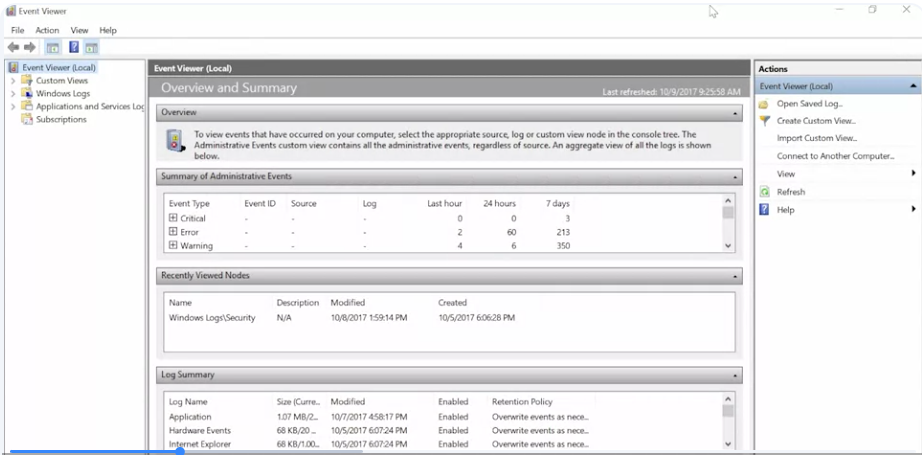 With a custom view, you can create a filter that will look across all the event logs the event viewer knows about, and tease out just the information you’re interested in. To do this, click on the Create custom view option in right-hand Actions pane. This will bring up a tab called Filter. From there, click the Error and critical checkboxes. We’re going to change the log drop-down menu to last hour. The event logs we’re going to select are just the Windows logs.Then click Okay. Then we’re going to give our view and new name. Okay, once more.
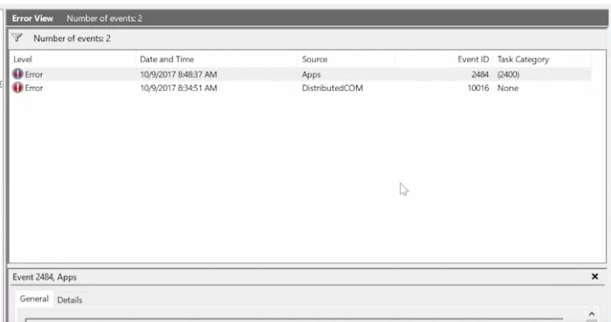 Once you’re done, you’ll see a new view come up under custom menus or only the events that matched your filter are displayed
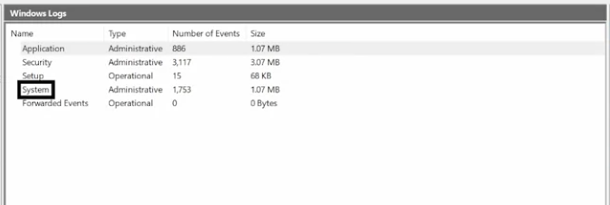
The Windows logs categories contain event logs that are generally applied to the whole operating system.
Let’s say you’re having an issue with a driver failing during start up. The log called system would be a good place to start.
If you want to see who’s been accessing the computer, then you begin investigating the security log.
The other category is called applications and services logs. This category contains logs that track events from a single application or operating system component instead of the system-wide events of the Windows logs category. For example, if you are having trouble with PowerShell and wanted to get more information about it, checking out the PowerShell log under applications and services log would be a great first step.
 Each event contains information grouped in columns about the event.
Like the logging level, information is the lowest level and critical is the highest.
The Event Viewer is a super helpful tool for IT support specialists. It can provide you with a lot of really detailed information about the problems any software or hardware might be experiencing on your system. There’s a lot of information in there though, so don’t forget about its custom views and filtering capabilities.