Linux - Disk Usage
To view the disk utilization on your computer in Linux, we can do this using the du-h command.
 The du or disk usage command shows us the disk usage of a specific directory. If you don’t specify a directory, it’ll default to your current one. The dash h flag gives you the data measurements in human readable form. You should use the du Command if you want to know how much disk space is being used by files in a directory.
Another command you can use if you want to know how much free space you have on your machine is the df command or disk free.
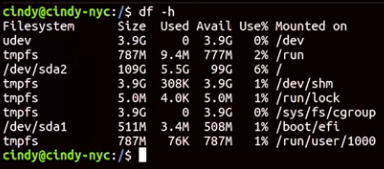 This shows you the free space available in your entire machine. The dash h flag gives you the data measurements in human readable form. You should use the df command if you want to know how much free space you have in your entire system
Linux generally does a good job of avoiding fragmentation more than windows. In common IT scenarios, you might find yourself running low on disk space. It’s up to you to investigate what files and folders are taking up space.