Windows - Process Creation and Termination
Session manager subsystem (smss.exe): Process that is in charge of setting some stuff up to work for the OS
Client/Server runtime subsystem (csrss.exe): System that handles running Windows GUI and Command line
Environment: Whatever settings or variables a child process inherits from the parent’s process
Unlike in Linux, Windows processes can operate independently of their parents
First, let’s launch the PowerShell process to give us a Windows command prompt. From there, we can type in notepad.exe to create a new process for the Notepad program.
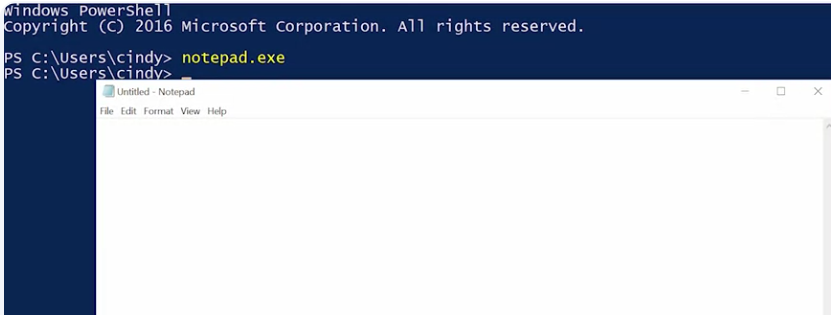 The parent process is PowerShell and the child is the Notepad application.
If we kill the parent process though, by clicking on the “X” button. Notice that Notepad keeps on running happily, even though its parent has been terminated.
There are other ways you can stop processes. You can use a command prompt command by calling on the taskkill utility. Taskkill, confined, and halt or process in a few ways.
One of the more common ways is to use an identification number. Know that’s the process ID or PID to tell taskkill which process you’d like stopped.
The parent process is PowerShell and the child is the Notepad application.
If we kill the parent process though, by clicking on the “X” button. Notice that Notepad keeps on running happily, even though its parent has been terminated.
There are other ways you can stop processes. You can use a command prompt command by calling on the taskkill utility. Taskkill, confined, and halt or process in a few ways.
One of the more common ways is to use an identification number. Know that’s the process ID or PID to tell taskkill which process you’d like stopped.
 For more information about taskkill, or ending one or more tasks or processes in Windows CLI, check out the link here.