Types of IT Infrastructure Services
Remember that you can set up different servers to run your services on like a server to run your file storage service. You can buy or rent hardware for these servers and set up and store them either on site or at another location essentially you manage these servers end to end
There’s another option, if you don’t want to be responsible for managing the hardware tasks and updating your server operating systems with security patches and updates. You can use the cloud alternative to maintain your own infrastructure which is called infrastructure as a service or IaaS.
IaaS providers give you pre-configured virtual machines that you can use just as if you had a physical server. Some popular IaaS providers are:
- Amazon web services and their elastic compute cloud or EC2 instances
- Linode which rents out virtual servers
- Windows Azure
- Google Compute Engine
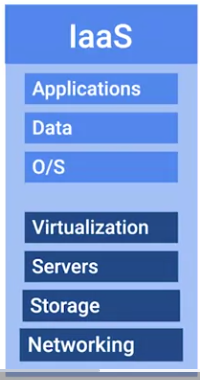
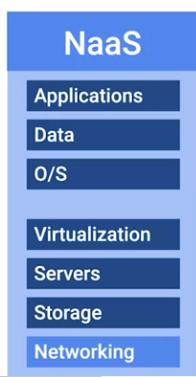
If your company is large networking is usually taken care of by a dedicated team but in smaller companies you probably be responsible for setting up the network. Network can be integrated in an IaaS provider, but in recent years it’s also been branched off into its own cloud service Networking as a Service or NaaS
NaaS allows companies to offshore their networking services so that they don’t have to deal with the expensive networking hardware. Companies also won’t have to set up their own network security, manage their own routing, set up a one and private internets and so on
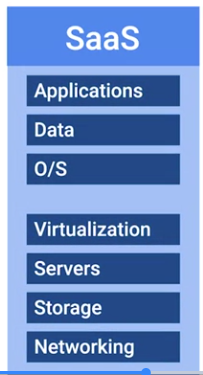
 The cloud alternative to maintaining your own software is known as Software as a Service or SaaS. Instead of installing a word processor on every machine, you can use Microsoft Office 365 or Google G Suite. These are both services that you can purchase that allow you to edit word documents, process spreadsheets, make presentations and more all from a web browser.
 Some companies have a product built around a software application. In this case there’s some things that software developers need to be able to code, build and ship their software:
1. First, specific applications have to be installed for their programming development environment
2. then depending on the product, they might need a database to store information.
3. Finally, if they’re serving web content like a website, they’ll need to publish their product on the internet.
If you’re building this entire pipeline yourself, you may need to set up a database and a web server. The programming development environment will also have to be installed on every machine that needs it. If you want an all in one solution to building and deploying a web application, you can use something called Platform as a Service or PaaS. This includes an entire platform that allows you to build code, store information in a database and serve the application from a single platform.
Some companies have a product built around a software application. In this case there’s some things that software developers need to be able to code, build and ship their software:
1. First, specific applications have to be installed for their programming development environment
2. then depending on the product, they might need a database to store information.
3. Finally, if they’re serving web content like a website, they’ll need to publish their product on the internet.
If you’re building this entire pipeline yourself, you may need to set up a database and a web server. The programming development environment will also have to be installed on every machine that needs it. If you want an all in one solution to building and deploying a web application, you can use something called Platform as a Service or PaaS. This includes an entire platform that allows you to build code, store information in a database and serve the application from a single platform.
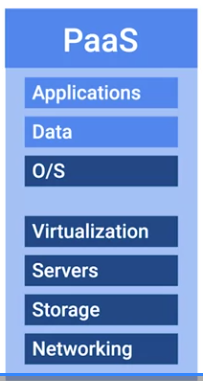 Popular options for PaaS are
- Heroku
- Windows Azure
- Google App Engine.
The last IT infrastructure service will discuss is the management of users access and authorization. A directory service centralizes your organization’s users and computers in one location so that you can add, update and remove users and computers. Some popular directory services that you can set up our Windows Active Directory and OpenLDAP. Directory services can also be deployed in the cloud using Directory as a Service or DaaS providers.
For more information on the following topics check out the following links: IaaS, NaaS, SaaS, and PaaS Providers.
For more detailed information on DaaS Providers check out Amazon here, Jumpcloud here and the Azure Active Directory here.
Heads up: A big part of being successful in an IT role is the ability to be a self-led learner – someone who finds key resources and reads up on the latest tech trends and solutions. The supplemental readings we’ve provided have been designed to show you just some of the support materials available to you online; they’re not meant to be considered a comprehensive list. Feel free to add to the conversation by posting other useful resources for learners to the Community