Remote Connections on Windows
PuTTY - a free, open source software that you can use to make remote connections through several network protocols, including SSH
SSH (Secure shell): A protocol implemented by other programs to securely access one computer from another
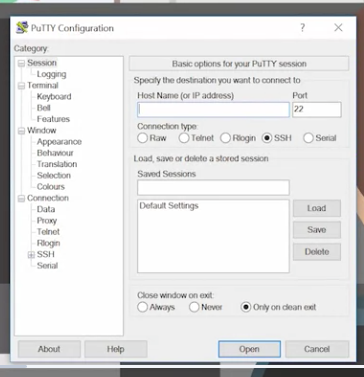 You can also open PuTTY from the command line
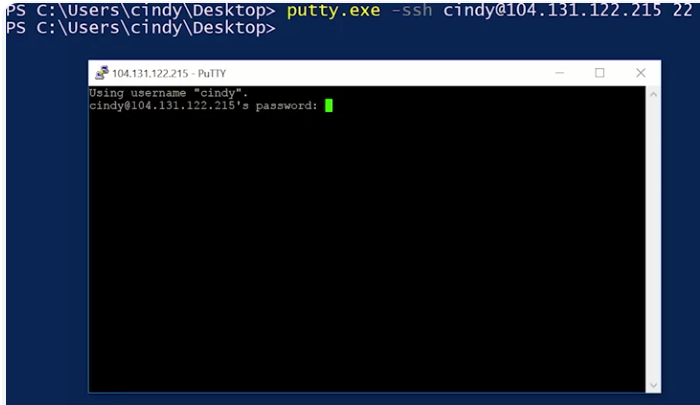
PuTTY also comes with a tool called plink or PuTTY link, which is built into the command line after PuTTY is installed. You can use plink to make remote SSH connections too.
SSH can be super useful especially if you want to connect from a computer running Windows to a Linux based operating system running remotely. Microsoft actually provides another way to connect to other Qindows computers called the remote desktop protocol or RDP.
A client program called the Microsoft terminal services client or mstsc.exe is used to create RDP connections to remote computers.
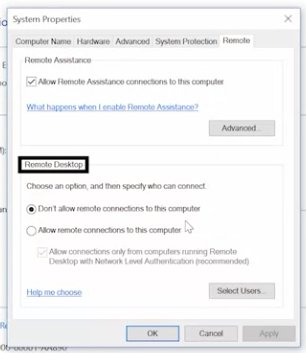
You can enable remote connections on your computer by opening up the start menu, right clicking on this PC, then selecting properties,
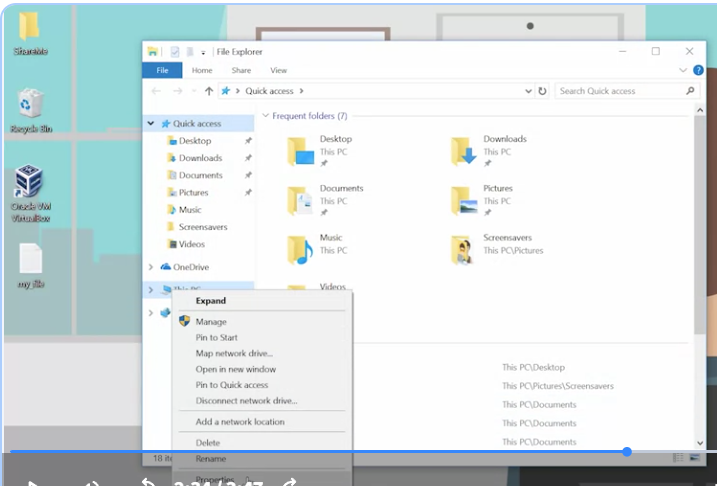 from there, select remote settings.
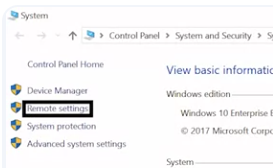 And then pick an option from the remote desktop portion of the panel. There are some security implications that come with allowing people to remotely connect to your computer.
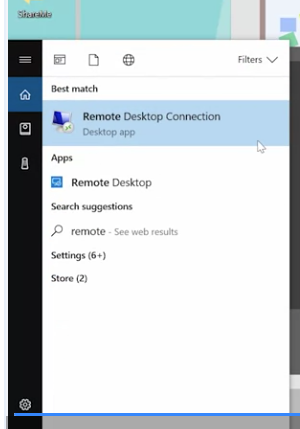
 You can launch the RDP client in a few ways. You can type mstsc at the run box or look up remote desktop connections in the start menu. Once you’ve launched the client, it’ll ask for the name or IP address of the computer you want to connect to.
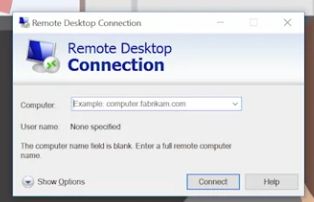 The Windows RDP client can also be launched from the command line where you can specify more parameters like slash admin. If you want to connect to the remote machine with administrative credentials.
SSH
Secure Shell (SSH) is a network protocol that gives users a secure way to access a computer over an unsecured network. SSH enables secure remote access to SSH-enabled network systems or devices and automated processes. It also allows for secure remote access to transfer files, use commands and manage network infrastructure.
OpenSSH
OpenSSH is the open-source version of the Secure Shell (SSH) tools used by administrators of Linux and other non-Windows for cross-platform remote systems management. OpenSSH has been added to Windows (as of autumn 2018) and is included in Windows Server and Windows client.
Common SSH Clients
An SSH client is a program that establishes secure and authenticated SSH connections to SSH servers. The following common SSH clients are Windows compatible:
PuTTY is a terminal emulator and the inspiration for all subsequent remote access systems.
-
Features: This tool offers Telnet, SSH, Rlogin (A remote login tool for use with UNIX-based machines on your network), and raw socket connections plus Secure File Transfer Protocol (SFTP) and Secure Copy Protocol (SCP) for file transfers between two hosts.
-
Protocols: SCP, SSH, Telnet, rlogin, and raw socket connection.
SecureCRT is a remote access system available for macOS, Linux, iOS, and Windows.
-
Features: It offers terminal emulation and file transfer through an SSH tunnel. It enables connections through many protocols and has usability features like tabbed sessions and customizable menus.
-
Protocols: SSH1, SSH2, Telnet, and Telnet/SSL
SmarTTY is a free SSH client with a multi-tabbed interface to allow multiple simultaneous connections.
-
Features: This tool includes SCP capabilities for file transfers. It also includes usability features like auto-completion, file panel, and package management.
-
Protocols: SSH and SCP
mRemoteNG is a remote desktop system with a tabbed interface for multiple simultaneous connections.
-
Features: The system enables connections with Remote Desktop Protocol (RDP), Telnet (two-way text communication via virtual terminal connections), Rlogin, Virtual Network Computing (VNC, a graphics-based desktop sharing system), and SSH.
-
Protocols: RDP, VNC, SSH, Telnet, HTTP/HTTPS, rlogin, Raw Socket Connections, Powershell remoting
MobaXterm is a remote access system built for Unix and Linux, and Windows.
-
Features: Features include an embedded X server (a graphical interface akin to windows), X11 forwarding (a way to run applications over a remote connection), and easy display exportation to let X11 applications know which screen to run on.
-
Protocols: SSH, X11, RDP, VNC
Key Takeaways
Secure Shell(SSH) is a way to securely connect two remote machines over an unsecured network.
-
You can use SSH to remotely control, transfer files from, and manage network resources for SSH-enabled clients.
-
OpenSSH is an open-source version for cross-platform management.
-
There are many common Window-compatible SSH clients with various features to fit any need, including PuTTY, SecureCRT, SmarTTY, mRemoteNG, and MobaXterm.