DNS for Internal Networks
The other reason we might want our own DNS servers is so we can map our internal computers to IP addresses. That way, we can reference a computer by name instead of IP address. There are a few ways we can do this.:
-
One is using a local host file, which contains static IP addresses to host name mappings. In Linux, our host file is called, etc/hosts. It has an IP address that points to 127.0.0.1, which points to a name called local host. This just references back to the computer. Local host is commonly used as a way to access a local web server. If I change this IP address mapping to ww.google.com, then save and open a web browser and type ww.google.com, it won’t take me there. I’m going to go ahead and change my local host to www.google.com.
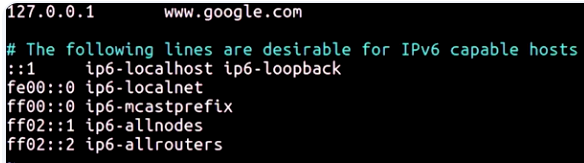 We’re going to save this, open my web browser to ww.google.com. As you can see, it didn’t take me anywhere. It just takes me back to my local computer.
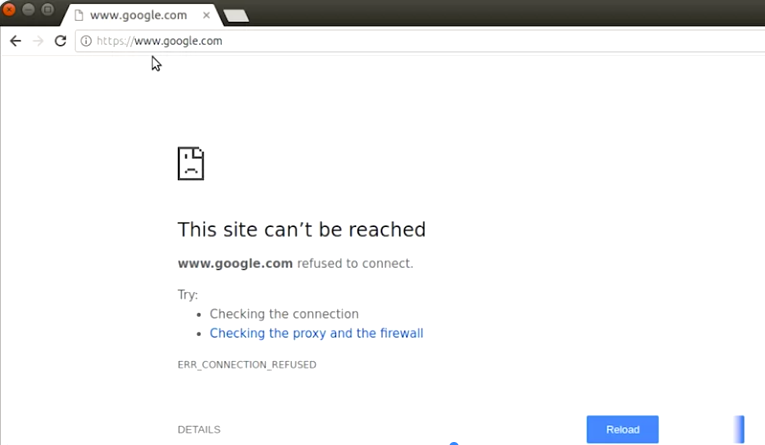 This is because a DNS query first checks our local host file, then our local DNS servers. If there’s an entry for google.com in my host file, it will go to that IP address instead. Let’s say, I wanted to access Natalie’s computer at 192.168.1.5, and her host name is catlady.examplecompany.com. I would have to enter this in my host file for every single computer in my fleet. That’s definitely not a scalable option.
 -
We can set up a local DNS server that contains all the organization’s computer names mapped to their IP addresses. This is a more central storage location for this information. Then we change our network settings for all our computers to use this DNS server instead of the one given to us by our ISP.
-
Finally, let’s look at one of the last DNS options we can use from internal network. It can be integrated with a directory service, which handles user and machine information in a central location like Active Directory and LDAP. Once we set up DNS and our directory service, it will automatically populate with machine to IP address mappings. There’s no need to enter this information manually.