Windows - Passwords
Remember, if you’re managing other people’s accounts on a machine, you shouldn’t know what their password is. Instead, you want the user to enter the password themselves.
To reset a password and the GUI, let’s go back to our computer management tool
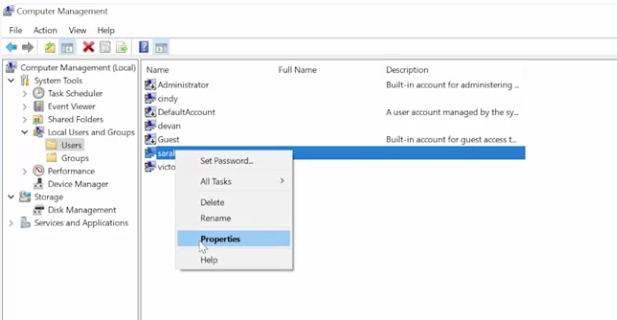
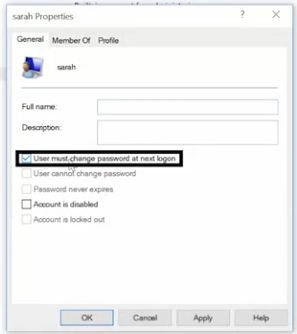 Then when the user logs into the account, they’ll be forced to change their password. If they forgot their password, you have the option to set a password for the manually by right-clicking and selecting “Set password”.
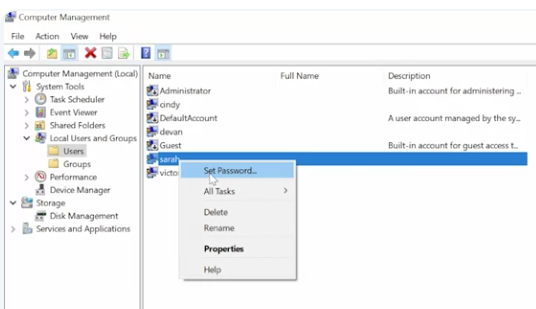
To change a local password and PowerShell, we’re going to use the DOS style Net command. Since this is an old DOS style command, you can also use the slash question mark parameter to get help on the command from the CLI. To change a password for user, the command is net user then the username and password.

The best way to use this command is to use an asterisk instead of writing your password out on the command line. If you use an asterisk, net will pause and ask you to enter your password like so.
 Why is this approach better? Imagine you’re changing your password and right at that moment, someone walks behind you and glances over your shoulder. Your password isn’t a secret anymore. You should also know that in many environments, it’s common that the commands that folks run on the machines they use are recorded in a log file that sent to a central logging service. So it’s best that passwords of any kind are not logged in this way.
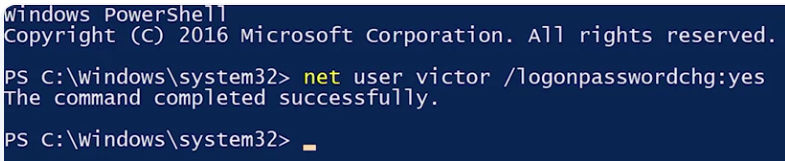
Do you notice a problem with the asterisk approach though? That’s right. If I change passwords for someone else using this command, I would know their password and that’s not good. Instead, we’re going do what we did in the GUI and force the user to change the default password on their next log on using the /logonpasswordchg:yes parameter.
You can check out more information on Windows and passwords here