Windows - File Permissions
ACL: Access Control Lists DACL: Discretionary Access Control List
- a note about who can use a file and what they’re allowed to do with it.
- Each file or folder will have an owner and one or more DACLs.
SACL’s: System Access Control List
- SACLs are used to tell Windows that it should use an event log to make a note of every time someone accesses a file or folder
If we go to Security tab, we can see the Permissions window here
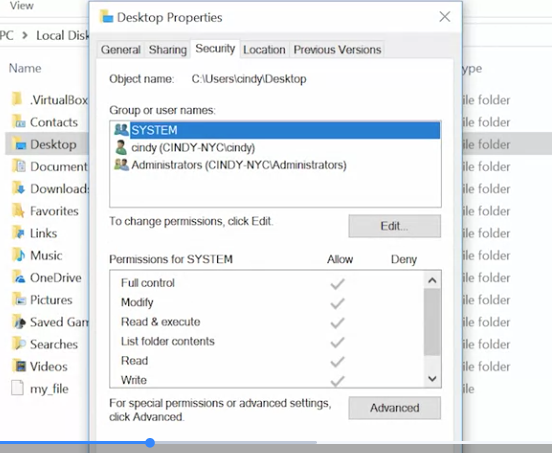 Let’s do a rundown of these permissions.
- Read: The Read permission lets you see that a file exists and allows you to read its contents.
- It also lets you read the files and directories in a directory
- Read and Execute: The Read and Execute permission lets you read files, and if the file is an executable, you can run the file.
- Read and Execute includes read, so if you select Read and Execute, Read will automatically be selected.
Let’s do a rundown of these permissions.
- Read: The Read permission lets you see that a file exists and allows you to read its contents.
- It also lets you read the files and directories in a directory
- Read and Execute: The Read and Execute permission lets you read files, and if the file is an executable, you can run the file.
- Read and Execute includes read, so if you select Read and Execute, Read will automatically be selected.
- List Folder Contents: List Folder Contents is an alias for Read and Execute on a directory. Checking one will check the other
- Write: The Write permission lets you make changes to a file.
- The Write permission also lets you create sub directories and write to files in the directory
- Modify: The modify permission is an umbrella permission that includes read, execute, and write.
- Full Control: A user or group with full control can do anything they want to the file.
- It includes all of the permissions of modify and adds the ability to take ownership of a file and change its ACLs.
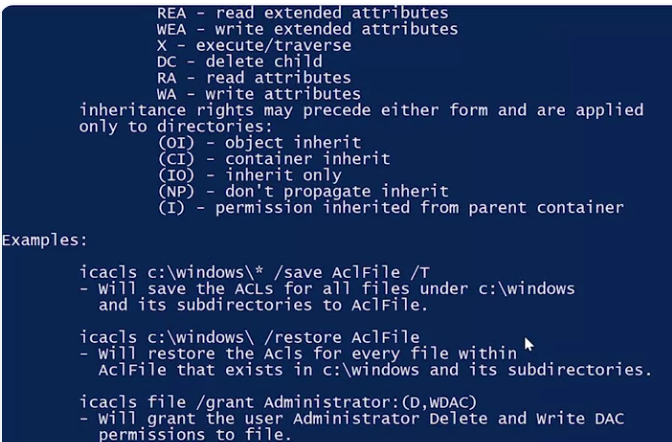
If we want to see which ACLs are assigned to a file, we can use a utility designed to view and change ACLs, called ICACLs or improved change ACLs.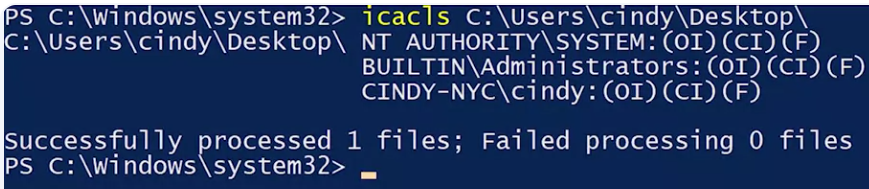 I can see the user accounts that have access to my desktop, and I can see that my account is one of them. But what about the rest of this stuff? These letters represent each of the permissions that we talked about before. Let’s take a look at the help for ICACLs.

For more information about access control lists (ACL) in Windows, check out the link here