Linux - SetUID, SetGID, Sticky Bit
In Linux, we also have special permissions. What if I want a user to be able to do something that requires root privileges, but I don’t want to give them these privileges?
There are certain commands that need to change files that are owned by root. Normally, if you need to change a file owned by root, you’d have to use sudo. But we want to be able to have normal users change these files without giving them root access.
Let’s say I want to change my password. I would use the password command like we’ve learned.
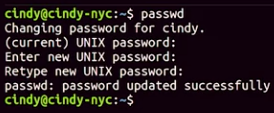 Now, I just enter my new password and my password is changed. We know that the password command secretly scrambles up our passwords, then adds them to this etc shadow file.
 It says this file is owned by root. How are we able to write or scramble passwords in this file if it’s owned by root?
Well, thanks to a special permission bit known as setuid, we can enable files to be run by the permissions of the owner of the file. In this case, when you run the password command, it’s being run as root.
 We see the permissions on this file look a little odd. There’s an S here where the X should be.
The S stands for setuid. When the S is substituted where a regular bit would be, it allows us to run the file with the permissions of the owner of the file.
The symbolic format uses an S, while the numerical format uses a 4 which you prepend to the rest of the permissions like this
We see the permissions on this file look a little odd. There’s an S here where the X should be.
The S stands for setuid. When the S is substituted where a regular bit would be, it allows us to run the file with the permissions of the owner of the file.
The symbolic format uses an S, while the numerical format uses a 4 which you prepend to the rest of the permissions like this
Similar to setuid, you can run a file using group permissions with setuid or set group-ID. This allows you to run a file as a member of the file group. Under our group permissions, we can see that the setgid bit was enabled, meaning that when this program is run, it’s run as the group TTY.

There’s one less special permission bit we should cover, and that’s the sticky bit. This bit sticks a file or folder down. It makes it so anyone can write to a file or folder, but they can’t actually delete anything. Only the owner of root can delete anything.
 I added the D flag to show information just for the directory and not the contents. But as you can see, there’s a special permission but at the end here, T. This means everyone can add and modify files in the slash temp directory, but only root or the owner can delete the slash temp directory.
The symbolic bit is a t and the numerical bit is a 1. Sudo chmod plus t my_folder, or sudo chmod 175 my_folder works
 or
or
