Windows - Swap
Virtual memory: A combination of hard drive space and RAM that acts like memory which our processes can use
- It does this by creating a mapping of virtual to physical addresses.
- It also doesn’t have to keep track of where the data it’s using is located in RAM
- Virtual memory also gives us the ability for our computer to use more memory than we physically have installed. To do this, it dedicates an area of the hard drive to use a storage space for blocks of data called pages.
- When a particular page of data isn’t being used by an application, it gets evicted, which means it gets copied out of memory onto the hard drive. This is because accessing data on RAM is fast, much faster than the hard drive where space is at a premium.
- Because of this, the operating system wants to keep the most commonly access data pages in RAM. It then puts stuff that hasn’t been used in awhile on the disk
- This way, if a program needs a page that’s not accessed a lot, the operating system can still get to it. But it has to read it from the comparatively slow hard drive and put it back into memory.
The Windows OS uses a program called the Memory manager: A Windows OS program that helps manage virtual memory
- Its job is to take care of that mapping of virtual to physical memory for our programs and to manage paging. In Windows, pages saved to disk are stored in a special hidden file on the root partition of a volume called page file.sis. Windows automatically creates page files and it uses the memory manager to copy pages of memory to be read as needed.
Windows provides a way to modify the size, number, and location of paging files through control panel applet called system properties. You can get to the system properties applet by opening up the Control Panel.
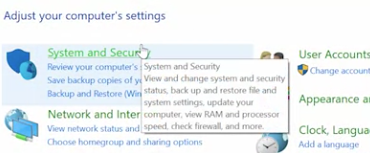
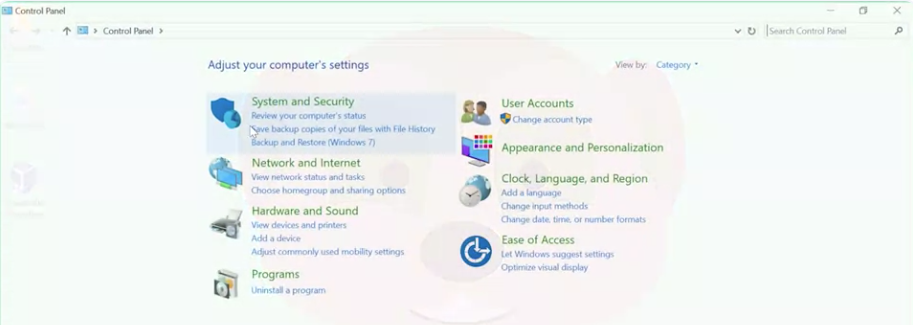 Go into the System and Security setting, and clicking on “System”.
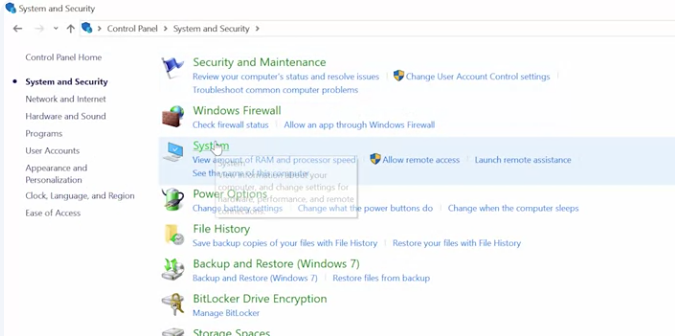 Once in the system pane, you can open up the advanced system settings on the left-hand menu.
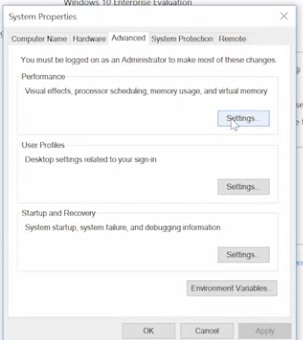
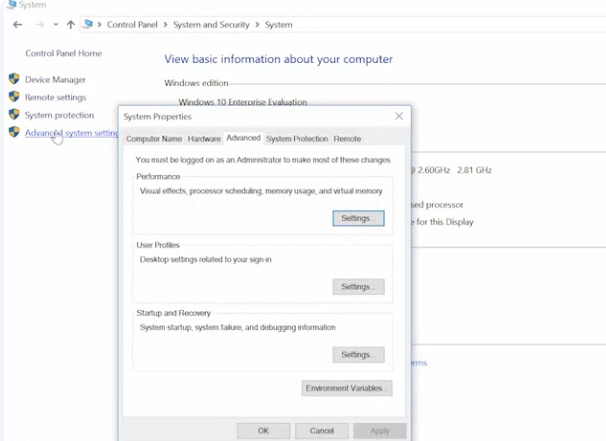 Pick the Advanced tab, then click on the ’Settings“ button in the performance section.
 One last time, click on the “Advanced” tab, and you should see a section called virtual memory, which displays the paging file size.
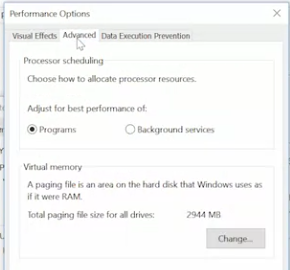 If you click the “Change” button, you can override the defaults Windows provides.
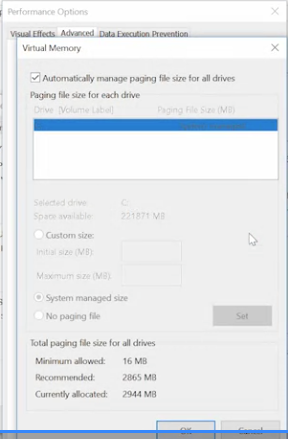 You can set the size of the paging file and add paging files to other drives in the computer. Unless you have a specific reason to change it, it’s generally fine let Windows automatically manage the paging file size itself.