Windows - Filesystem Repair
When you copy something from your OS to your USB drive, it first gets copied to a data buffer because RAM operates faster than hard drives. So if you don’t properly unmount a file system and give your buffer enough time to finish moving data, you run the risk of data corruption
- the power to the building went out, causing your computer to suddenly shut off. This kind of crash also causes data corruption.
- System failures or software bugs can cause data corruption as well. The NTFS file system has some advanced features built into it that can help minimize the danger of corruption.
One of these features through a process called journaling, logs changes made to a file metadata into a log file called the NTFS Log. By logging these changes NTFS creates a history of the actions it’s taken.
- If a crash or bug does cause corruption, the file system can initiate recovery process that will use that log to make sure the system is in a consistent state.
In addition to journaling NTFS and Windows implement something called self-healing. As you might guess from the name the self-healing mechanism makes changes to minor problems and corruption on the disk automatically in the background.
- It does this while Windows is running so you don’t need to perform a reboot
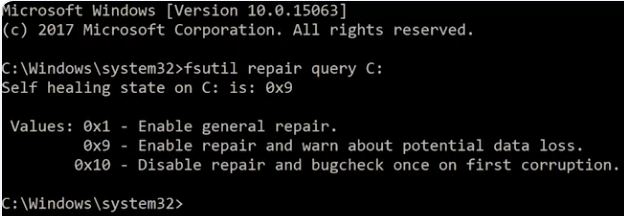
If you want to check the status of the self-healing process on your computer, you can open up an administrative command prompt and use the fsutil tool like this. Fsutil repair query, and I want to query in my C drive.
To run check disk manually, you can open up an administrator command prompt and type check disk onto the command line.
By default check disk will run in read only mode, so I’ll give you a report on the health of the disk but won’t make any modifications or repairs to it. You can tell check disk to fix any problems it finds with the /F flag. You can also specify the drive you want to check, like this. Write checkdisk/F. I’m going to check my thumb drive which is on the D.
