Windows - Special Permissions
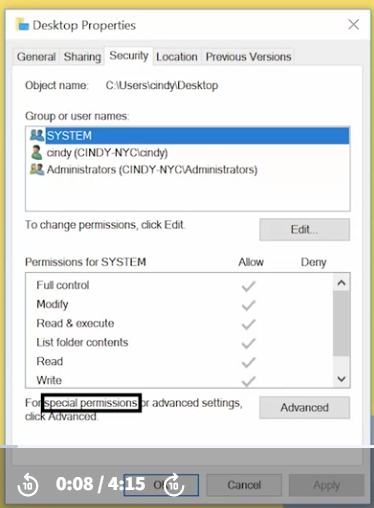 The permissions that we’ve been looking at and setting so far are called simple permissions. Simple permissions are actually sets of special or specific permissions.
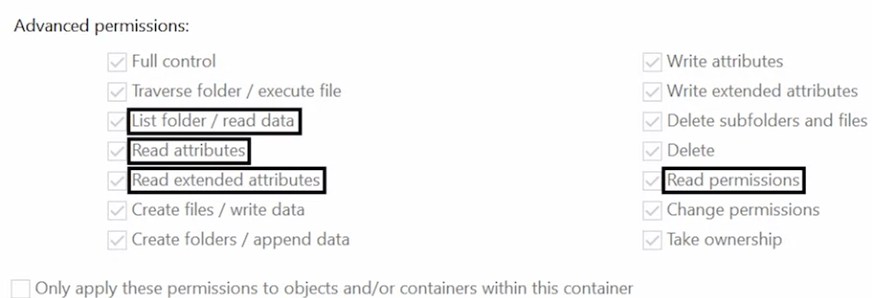
I’m going to click on the Advanced tab under my Permission setting. When I click on a username and then go to advanced permissions, I can see a list of all the special permissions enabled on that file.
When we select a basic permission like read, we’re actually enabling the special permissions list folder/read data, read attributes, read extended attributes, read permissions, and synchronize, which are just fine tuned permissions.
To view special permissions on a file in the CLI, we will simply use the icacls command as before. Let’s take a look at a more interesting example than my desktop folder, icacls C:\Windows\Temp This directory is used to hold temporary files for all users in the system.
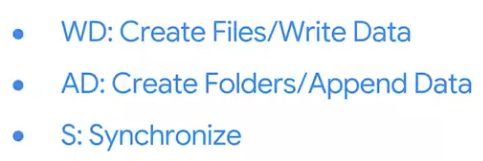
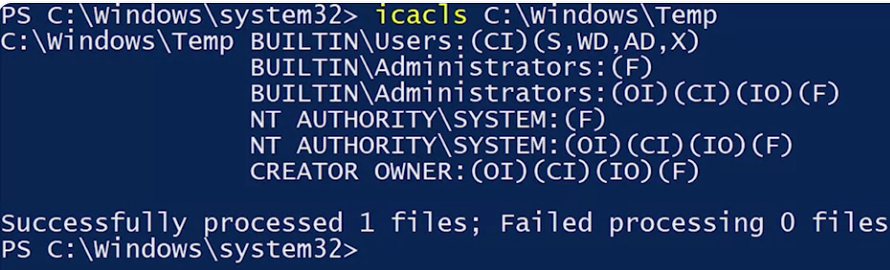 First, local administrators and the operating systems computer account have full permissions over this folder, and all files and folders within it. We see a new descriptor, IO, which indicates that this DACL is inherent only. That means that it will be inherented, but it does not apply to this container; C:\Windows\Temp. The user’s group includes all user accounts on the local machine.
 If you see CREATOR OWNER. CREATOR OWNER is a special user that represents the owner of whichever file the DACL applies to. In this directory, and all subdirectories, whoever owns a file or folder has full control of it.

For more information about file and folder permissions in Windows, check out the link here