Linux - Files
Metadata and files are organized into a structure called an Inode. Inode: A file structure for metadata and files
- Inodes are similar to the Windows NTFS MFT records.
- We store Inodes in Inodes table and they help us manage the files on our file system.
- The Inode itself doesn’t actually store file data or the file name, but it does store everything else about a file.
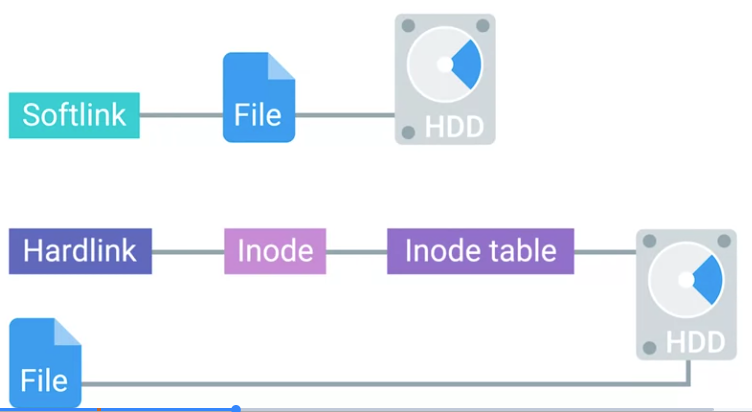
Shortcuts in Linux are referred to as soft links or sim links.
- They work in a similar way symbolic links work in Windows, in that they just point to another file.
- Soft links allow us to link to another file using a file name. The other type of link found in Linux are hard links.
- Similar to Windows, hard links don’t point to a file and Linux they link to an Inode which is stored in an Inode table on the file system.
- Essentially, when you’re creating a hard link, you’re pointing to a physical location on disk or more specifically on the file system. But if you deleted a file of a hard link, all other hard links would still work.
If we did an ls -l on this file, important file.
You’ll notice the third field in the details. This field actually indicates the amount of hard links the file has.
 When the hard link count of a file reaches zero, then the file is completely removed from the computer
To create a soft link, we can run the command ln with the flag, -s for soft link. So ln -s \important_file important_file_softlink.

To create a hard link, we can run the ln command without the dash s to specify a hard link. So ln important_file important_file_hard link.
 Now, if we check ls- l important_file, we’ll see that the hard link count was increased by one.

Hard links are great, if you need to have the same file stored in different places, but you don’t want to take up any additional space on the volume.
You could use soft links to do the same thing. But what if you moved one file, broke the soft link and forgot about all the other places that you used it. Those would be broken too, it may take some time to clean up.