Configuring Services in Linux
Most services are enabled as soon as you install them. These are programs that are shipped with the defaults that are good enough to safely start serving right away. But not all services can provide default values that are suitable for everyone. In some cases you will need to edit the configuration files before the service can go live.
On Linux, the configuration files for the installed services are located in the /etc directory. And while some software may ship graphical configuration editors, you typically have to edit the configuration files with a text editor.
Let’s experiment with a simple ftp server called vsftpd. A service that gets enabled by default when installed
So I’m going to go ahead and type in sudo apt install vsftpd to install the service.
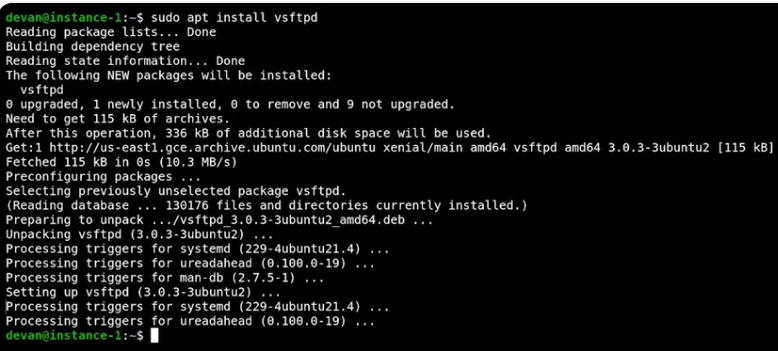 Once it’s done installing the service is already running. We can query the status of the service by running service vsftpd status and see that it’s running.
 This tells us that the service is already running. We can also verify that it’s running by connecting to the ftp server with an ftp client. To do this, I’m going to go ahead and type in lftp local host.
 Lftp is an ftp client program that allows us to connect to an ftp server
Now, let’s try to run the ls command to list the contents of the current directory. So when type in ls And then type in exit.
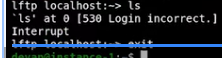 This is failing because it’s requiring a username and password and we aren’t providing them.
If we really want to enable anonymous connections will have to do that explicitly. Let’s modify the configuration file to allow anonymous connections. To do that I’ll edit the configuration file for this service that’s located in the /etc/vsftpd.config to change the anonymous enable setting from No to Yes. So we go sudo vim /etc/vsftpd.config.
 This will open up my config file and I’m going to go ahead and change and the anonymous enable from No to Yes.
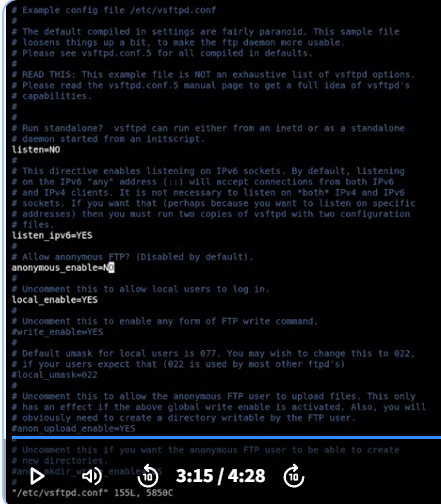 Save my configuration file. By changing the value of the anonymous enable setting from No to Yes, we’re telling the ftp server program that we want to allow anonymous connections.
We’ve made the change but we aren’t done yet. If we try to connect again, ls will still fail.
This will also happen with other services because most services read their configuration when they start and then keep it in memory while they’re running. In order for our service to re-read the configuration, we need to tell it to reload.
Reloading means that the service re-read the configuration file without having to stop and start.
 Once we’ve done this, we can try to connect again and this time executing ls will succeed